

Divide the vertices into two groups
The left group contains A and B; the right group contains 1, 2, and 3. A connects to 1 and 2, while B connects to 2 and 3. Every edge goes between the groups, with none inside either group.
A graph is bipartite when its vertices can be divided into two groups so that every edge joins different groups. The groups do not need to have the same number of vertices.
Read the relationships represented by edges
If A and B are people and 1, 2, and 3 are jobs, an edge marks a job a person can do. Job 2 connects to both people, so either can do it. The edges show possible assignments; they do not select the actual assignments.
Placing the groups on opposite sides makes these options easier to compare. Use labels and a description to explain what each side represents.
Use the layout to check the grouping
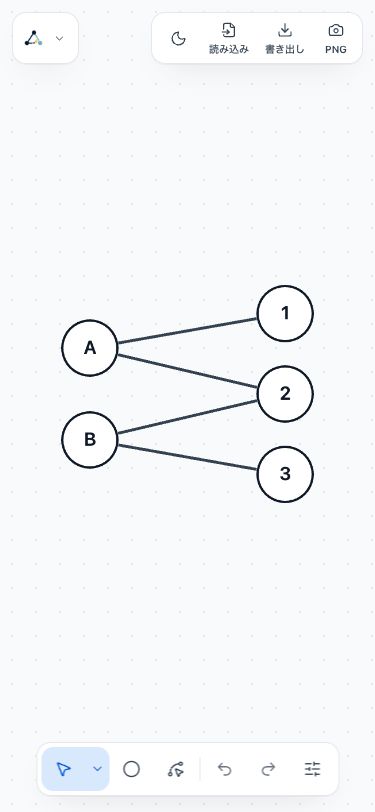
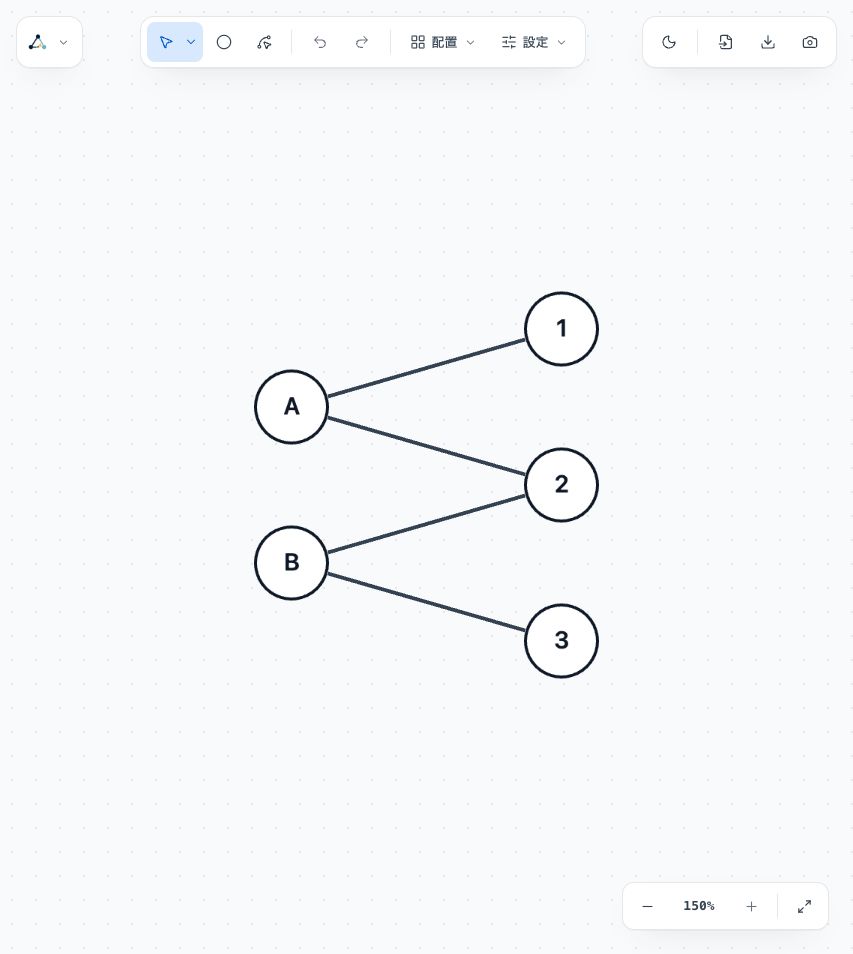
Load this input as edge pairs with no header, then choose Bipartite in Layouts. Moving vertices does not change whether the graph can be divided into two such groups.
An odd-length cycle, such as a triangle, always leaves an edge inside one group however you divide its vertices. A graph with such a cycle is not bipartite, so Bipartite layout is unavailable.
Compare the input and diagram
Input to copy
A 1
A 2
B 2
B 3
Graph diagram