
Make your first graph
Choose a starting point that fits what you have.
Detailed steps and notes
Start from data
- Open Start from data or Load.
- Paste the text and check the preview.
- Choose Apply to graph to load it onto the canvas.
Choose a sample
- Open Choose a sample.
- Pick a graph and adjust its parameters, if available.
- Apply it, then edit its nodes and edges.
Draw your own
- Choose Draw your own to enter Node mode.
- Click empty spots to place nodes.
- Switch to Edge and select two nodes in order.
See how your input becomes a graph
Set Undirected and 1-indexed. Copy an example, paste it into Load, then apply.
Draw a graph from an edge list
Input to copy
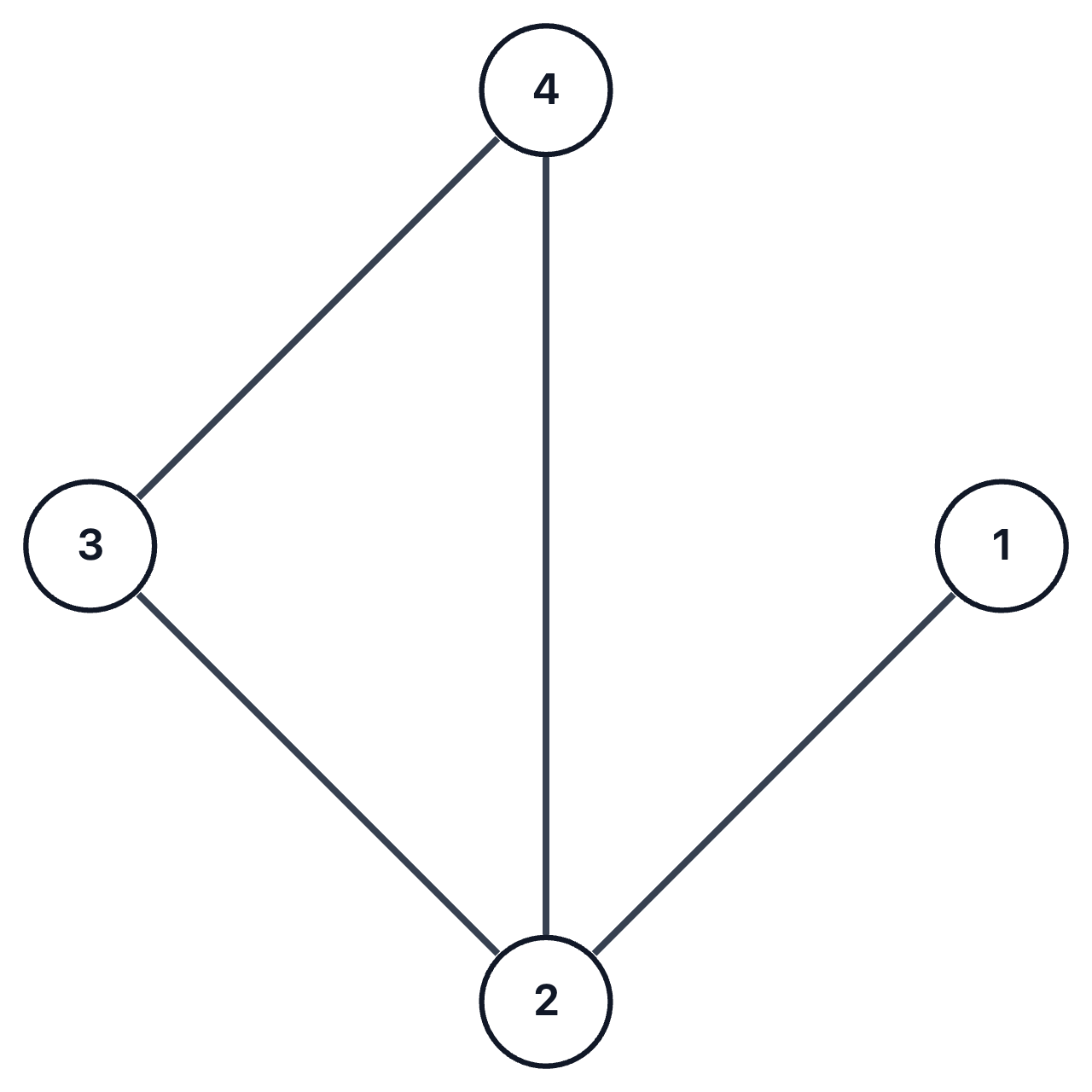
4 4
1 2
2 3
2 4
3 4
Graph diagram
Detailed steps and notes
Choose Undirected and 1-indexed in Settings, copy a complete code block into Load, then choose Apply to graph. The diagrams show connectivity; positions depend on the layout you select.
Choose “edge list with counts” in Format. The first line, 4 4, gives the vertex and edge counts. Each following line connects two vertices.
4 vertices and 4 edges: 1–2, 2–3, 2–4, and 3–4.
Convert an adjacency matrix to a graph
Input to copy
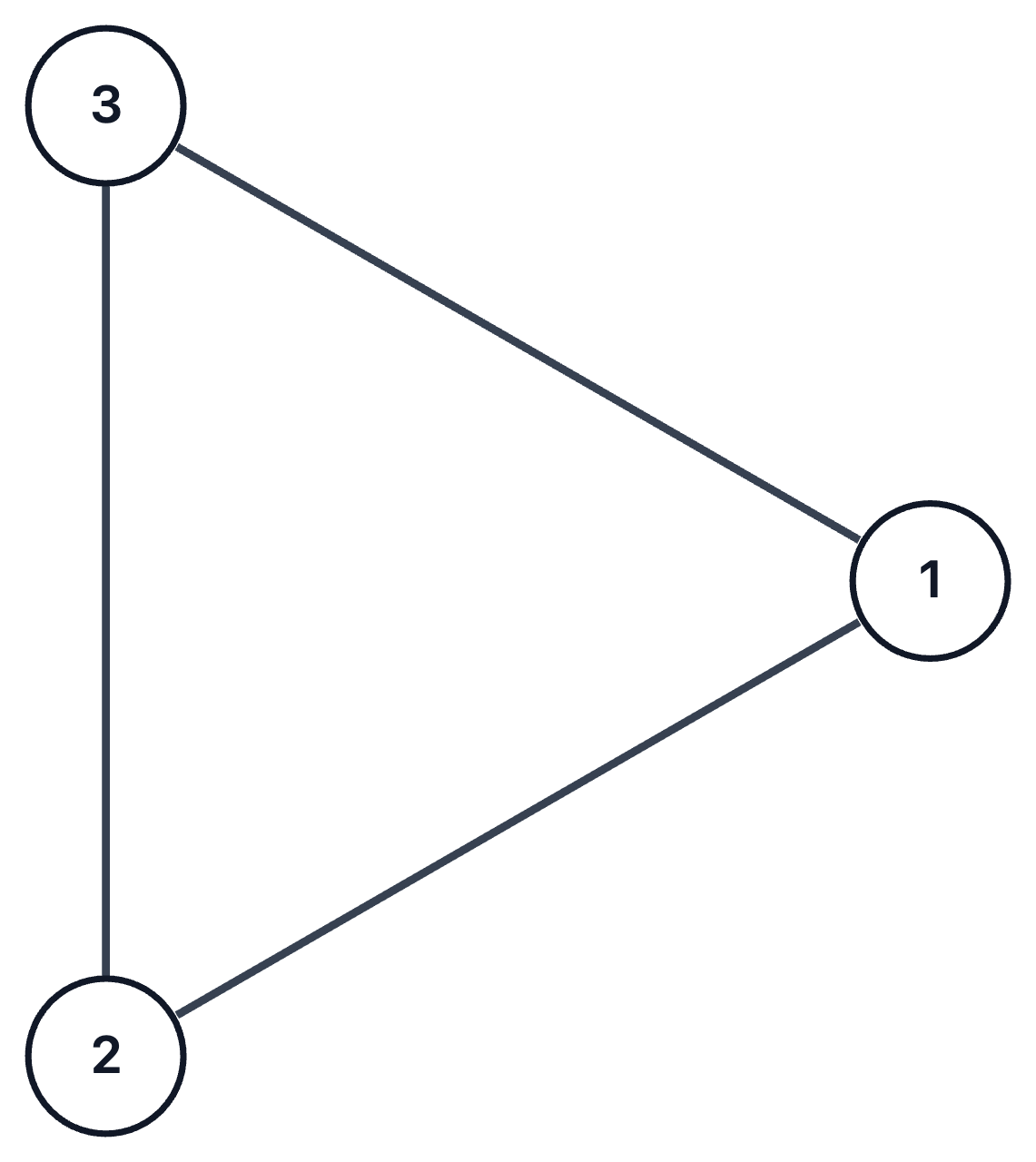
0 1 1
1 0 1
1 1 0
Graph diagram
Detailed steps and notes
Choose Undirected and 1-indexed in Settings, copy a complete code block into Load, then choose Apply to graph. The diagrams show connectivity; positions depend on the layout you select.
Choose adjacency matrix. Rows and columns represent vertices; 1 means an edge and 0 means no edge. This symmetric matrix describes an undirected graph.
3 vertices and 3 edges form a triangle, with every pair connected.
Visualize a weighted tree
Input to copy
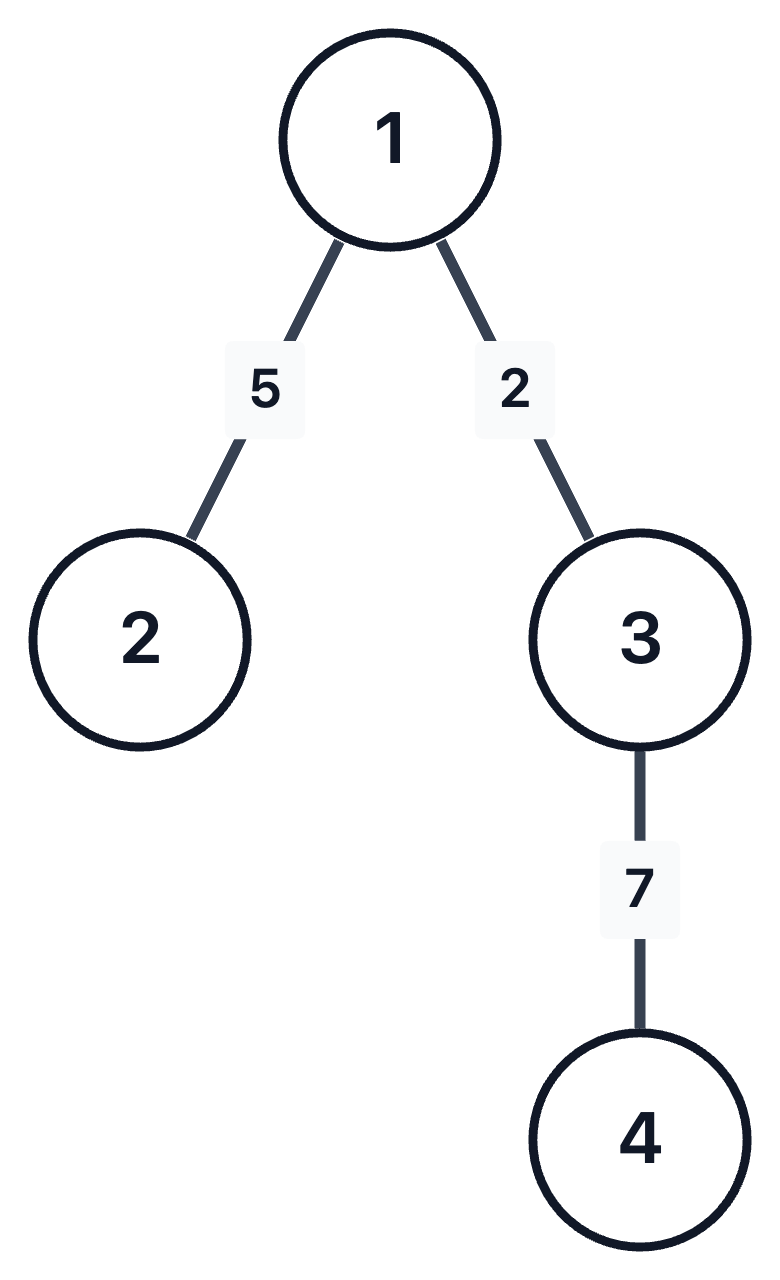
4 3
1 2 5
1 3 2
3 4 7
Graph diagram
Detailed steps and notes
Choose Undirected and 1-indexed in Settings, copy a complete code block into Load, then choose Apply to graph. The diagrams show connectivity; positions depend on the layout you select.
Choose “edge list with counts” in Format. The third column is the edge weight. After importing, select the tree layout to see the hierarchy.
A tree with 4 vertices and 3 edges: 1–2 has weight 5, 1–3 has weight 2, and 3–4 has weight 7.
Load text or a file
Check the format and node count before replacing your graph.
Detailed steps and notes
Open Load
Paste your text, or choose Open file to select a text file or a Graph Editor JSON document.
Check the format and preview
The editor detects the format. If several interpretations are possible, choose one in Format. It also infers whether numbering starts at 0 or 1, so check the node labels.
Choose Apply to graph
This replaces the current graph with the previewed result. Review any warnings before applying. Undo restores the graph from before the import.
All supported input formats
- Edge list with N M header
4 4 1 2 2 3 2 4 3 4- Edge pairs (no header)
1 2 2 3- Tree edge list (N, then N−1 edges)
4 1 2 1 3 3 4- Parent list
4 1 1 3- Weighted parent list
4 1 5 1 3 3 2- Adjacency list
1: 2 3 2: 4- Adjacency matrix
0 1 1 1 0 1 1 1 0- Graph Editor JSON (empty graph)
{
  "version": 1,
  "nodes": [],
  "edges": [],
  "settings": {}
}
Place nodes and connect them
Use the three toolbar modes for different tasks.
Detailed steps and notes
Place a node with Node
Click or tap an empty spot on the canvas to add a node. Press N to switch to this mode.
Connect two nodes with Edge
Select the source, then the target. In a directed graph, the arrow follows that order. Click empty space or press Esc to cancel a connection in progress.
Adjust positions with Select
Drag a node to move it or an edge to bend it. Select a node or edge to open the action bar for editing or deleting it.
- To select a group, hold Shift and drag in Select mode. The arrow beside Select chooses All, Nodes only, or Edges only for box selection.
- Ctrl (⌘ on Mac) + Shift + drag selects nodes only. Ctrl (⌘ on Mac) + Alt + drag selects edges only.
- Double-click or select an element and press Enter to edit its label or weight. Right-click opens its edit menu.
Change colors, labels, and graph settings
Highlight part of the graph and adjust its numbering and arrows.
Detailed steps and notes
- Select nodes or edges, then choose a color in the action bar. This also works with multiple elements selected. Press C to cycle their colors.
- Settings switches between directed and undirected graphs, weighted and unweighted edges, and 0-indexed and 1-indexed numbering. It also controls arrow size and node-label visibility.
- Select directed edges to Reverse their direction, or use Reverse all edges in Settings to change the whole graph.
- After bending an edge, choose Return to automatic routing to restore its automatic path. The right-click menu also offers Bend left and Bend right.
- Enable Snap drags to grid in Settings to align nodes while moving them.
Try a sample and choose a layout
Change where nodes sit while keeping their connections.
Detailed steps and notes
In Load, choose Use a sample to pick a tree, cycle, grid, or another graph. Search by name or filter by category. For samples with parameters, adjust values such as the node count before applying.
Open Layout (L) to rearrange a graph. Start with Auto layout, or try Circle and Grid to compare simple arrangements.
- Use Tree for a tree or forest, DAG for a directed acyclic graph, and Bipartite for a bipartite graph. A layout is disabled when its requirements are not met; its tooltip explains why.
- BFS layers groups nodes by distance from a starting node; Radial arranges distance layers in circles. Select one node first to use it as the starting node, or as the root for Tree.
- SCC groups nodes of a directed graph by strongly connected component. Line, Concentric, and Resolve overlap offer other arrangements.
- Offset overlapping edges bends edges automatically to avoid nodes where possible. If overlaps remain, move the nodes or bend individual edges by hand.
Choose an export for your next step
Use JSON to keep editing your graph and PNG to share a diagram.
Detailed steps and notes
Save for editing with JSON
In Export, choose JSON as the format and save the .json file. It preserves nodes, edges, labels, positions, colors, bends, and graph settings. Open it through Load to resume editing.
Share an image with PNG
Open PNG, choose the whole graph or current view, and set the background and padding. For the whole graph, choose a long-edge size, the current zoom, or a fixed canvas. Check the preview, then save or copy.
Use connection data as text
In Export, choose Edge list, Adjacency list, or Adjacency matrix. These formats omit positions, colors, and manual bends; custom labels may be replaced with consecutive numbers. If a format cannot represent your edges or weights, choose JSON or a compatible edge list.
Include a diagram in TeX with TikZ
Choose TikZ (TeX), then copy the code or save a .tex file. Add the packages listed in the opening comments. Japanese labels need LuaLaTeX and luatexja; other Unicode labels need an appropriate engine and fonts.
Work with the keyboard
These shortcuts control the canvas when you are not typing into a field.
- Select / Node / Edge mode
- VNE
- Clear selection or cancel drawing an edge
- Esc
- Delete selected elements
- DeleteBackspace
- Undo
- Ctrl+Z⌘Z
- Redo
- Ctrl+Shift+Z⌘⇧ZCtrl+Y
- Select all
- Ctrl+A⌘A
- Copy / cut / paste a selection
- Ctrl / ⌘ + C / X / V
- Edit a label or weight
- Enter
- Cycle selected colors
- C
- Nudge selected nodes
- ← ↑ → ↓
- Move selected nodes by a larger step
- Shift + ← ↑ → ↓
- Fit the whole graph to view
- Shift+1
- Reset zoom to 100%
- Ctrl+0⌘0
- Layout / Settings / shortcut list
- L,?
Detailed steps and notes
Use Ctrl on Windows and Linux, and ⌘ on Mac.
Move the view and work on a phone
Move the visible area without changing node positions.
Detailed steps and notes
- Drag empty canvas to pan the view. On a phone, use two fingers to zoom and move the view.
- In Node, tap empty space to add a node. In Edge, tap two nodes in order to connect them.
- In Select, tap a node or edge and use the action bar to change its color, edit its label, or delete it. Drag nodes to move them and edges to bend them.
- If your graph moves off screen, use Fit graph to view. With a keyboard, Shift+1 fits the whole graph.
When something does not work
Check these points for input, saving, and display problems.
Why does my input produce a different graph?
Choose the format explicitly, then check the counts in the first line, the number of columns, and whether numbering starts at 0 or 1. Review warnings and the preview before applying. Change directed or undirected in Settings if needed.
Draw a graph from an edge listWhere is my graph saved?
The graph is stored locally in this browser; its contents are not sent to a server. It does not sync to another browser or device. Clearing this site's data removes the saved graph, so export important work as JSON for backup.
What should I do if autosave fails or another tab changes the graph?
Your current work stays on screen. First choose Save my graph to download a JSON backup. For a failed save, choose Retry; for a conflict, review the other document before choosing Use the other tab's graph. If autosave is unavailable, keep saving JSON files.
How large can a graph be?
The limit is 1,000 nodes and 5,000 edges, with up to 256 characters per label or other text field. Text input accepts up to 1,000,000 characters and JSON up to 2,000,000. Some layouts are disabled for large graphs, and automatic routing or overlap resolution may leave overlaps to adjust by hand.
What if copying an image or text fails?
Browser clipboard permissions can prevent copying. Save the PNG or download the text as a file instead. If an export format cannot represent the graph, choose a compatible format such as JSON.
What if I cannot see the graph?
If it is off screen, fit the graph to view. If a display error appears, save a JSON backup and choose Retry. A failed sample load can also be retried, or you can return to Paste and continue working.
Do I need to pay or create an account?
It is free and requires no account. The source code is available on GitHub.