
The vertex-and-edge count header
The first line, 4 4, says that there are four vertices and four edges. The vertex labels run from 1 to 4. Each of the next four lines names a pair of connected vertices.
Some edge lists omit this header and begin with a pair such as 1 2. Check the stated input format rather than deciding from the first two numbers alone.
Match each line to an edge
The line 1 2 joins vertices 1 and 2. The next lines, 2 3 and 2 4, also connect vertex 2 to 3 and 4. Adding 3 4 completes a triangle among vertices 2, 3, and 4.
This example is undirected, so the endpoint order does not give the edge a direction. For a directed graph, also check which endpoint is the source and which is the destination.
- Three edges meet vertex 2, while one edge meets vertex 1.
- Moving a vertex changes its position, not the endpoints of its edges.
Check the import preview
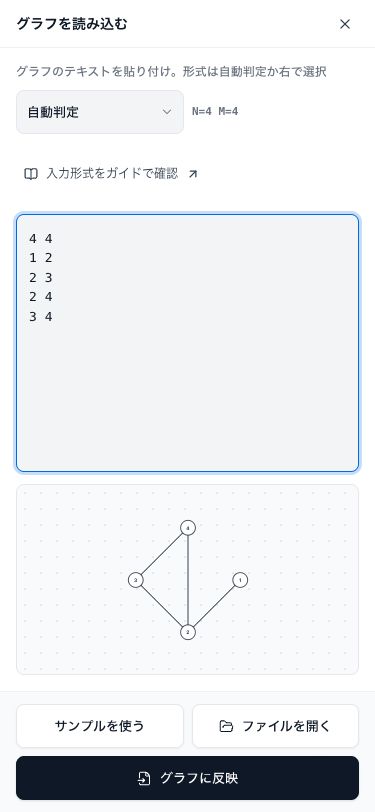

Graph Editor's Load preview shows the format and vertex and edge counts. For this input, check that the format is edge list with counts and that the preview has four vertices and four edges before applying it.
Also check whether labels start at 0 or 1 and whether the graph is directed or undirected. If you edit this input, update the header's edge count to match the number of edge lines.
Compare the input and diagram
Input to copy
4 4
1 2
2 3
2 4
3 4
Graph diagram